

AI has increased my productivity; I can post more often because I ask it to research a topic before I write about it. For example, I asked Google’s NotebookLM to create a Deep Research report on “AI in Photography”, and I complemented that with a similar search by Anthropic’s Claude chatbot. I like Claude’s writing style; both personable and thorough. Gone are the days that I chase links of search-page results.
The research is theirs, but the writing is my own. I also bring first-hand experience with the use of my cameras, and the editing software I use to process my photos.
I have added a Glossary of terms at the end of this blog. Claude helped me with the definitions.
The cameras I use to take photos
I take photos with an iPhone 17 Pro, a Leica SL2-S with various lenses, and a Hasselblad X2D II and a 38mm lens. The iPhone 17 Pro is always in my pocket, so it is my default camera. I like adding my shots to my Photos Library and sharing them with friends and family.
When I want to be more serious about my photography, I will choose either the SL2-S with a Leica 24-70mm zoom lens, and the Hasselblad X2D II. The Hassy (as it is affectionately called) has a 100-megapixel sensor and shoots 16-bit color. Hasselblad’s ‘color science’ is second to none.
The software I use for image processing
In all my travels, I have met only two people who take their images right out of the camera: Ross Corsair and Mark de Paola. Everyone else I know does some processing in post.
Here are the Mac desktop tools in my editing arsenal:
Adobe Lightroom Classic, Adobe Lightroom, Adobe Photoshop,
DxO PhotoLab 9, DxO PureRAW 5,
Topaz Photo, Topaz Video, and Topaz Gigapixel.
I also have the DxO Filmpack and NIK filter plugins for Adobe Lightroom.
Hasselblad uses its own software, Phocus, which handles its own version of RAW files with the .3FR suffix. Adobe’s Lightroom Classic supports the Hasselblad format and gives you a choice of importing them as-is or converting them to DNG format.
There are iOS apps for Adobe products, Leica has an app called “Leica Fotos” that allows you to connect to a Leica camera to download and edit photos on your phone or iPad. Hasselblad has the “Phocus 2” app that connects to the Hasselblad camera to download and edit photos. It can handle HDR photo editing and apply an HNNR noise reduction filter to RAW files.
I find the Leica app a bit finicky in that I cannot always join the wireless network that the camera creates. However, the Hasselblad Phocus 2 app works like a charm every time.
In a previous post, I discussed how Apple’s AI Computational Photography processes your iPhone photos and videos. In the next section, I will discuss how AI is embedded into other software. By the way, quite a bit is done in-camera as well.
AI in Photography Software
In this section we review how AI is incorporated into the software. I have provided a glossary of terms used in our discussions at the end of this post.
Adobe’s Sensei Platform
Sensei is Adobe’s AI and machine learning framework found in Creative Cloud applications (such as Lightroom and Photoshop) as well as Document- and Experience-clouds. Sensei combines Artificial intelligence, machine learning, and deep-learning neural networks. The systems have been trained on billions of images to recognize patterns, understand semantic content, and most importantly, predict user intent.
Examples of AI-powered masking include such commands as “Select subject”, “Select sky”and “Select people”. In Auto Settings, Sensei analyzes the tonal distribution, color balance, and compositional features of the images, to suggest edits.
I was ‘floored’ the first time i used the “Auto” button to allow Lightroom to edit my photo. Before it actually made the edits, it told me that “thousands of expert photographers” would have applied the edits it was about to apply to my image. Wow.
DxO AI Software
I sometimes use DxO PhotoLab 9 software on my photos. DxO is noted for excellent noise-reduction. They also support most cameras and lenses and correct for chromatic aberrations. Their signature products are the DeepPrime and DeepPrime XD tools.
Topaz Software
Topaz Photo is great for restoring old, scratched-up photos and bringing them back to life. Topaz is also very good for scaling up a photo and sharpening it. Topaz built its entire product strategy around specialized neural networks trained for specific photographic challenges: denoising, sharpening, upscaling, and comprehensive enhancement.
Hasselblad Software
Hasselblad has taken a more conservative approach to AI, and has focussed more on creating the best possible images. The Hasselblad Natural Color Solution (HNCS) employs sophisticated color science that render skin tones and saturated reds and blues that many RAW processors struggle with. So, Hasselblad eschews AI for good old color science developed over decades.
AI takes on ‘AI in Photography’
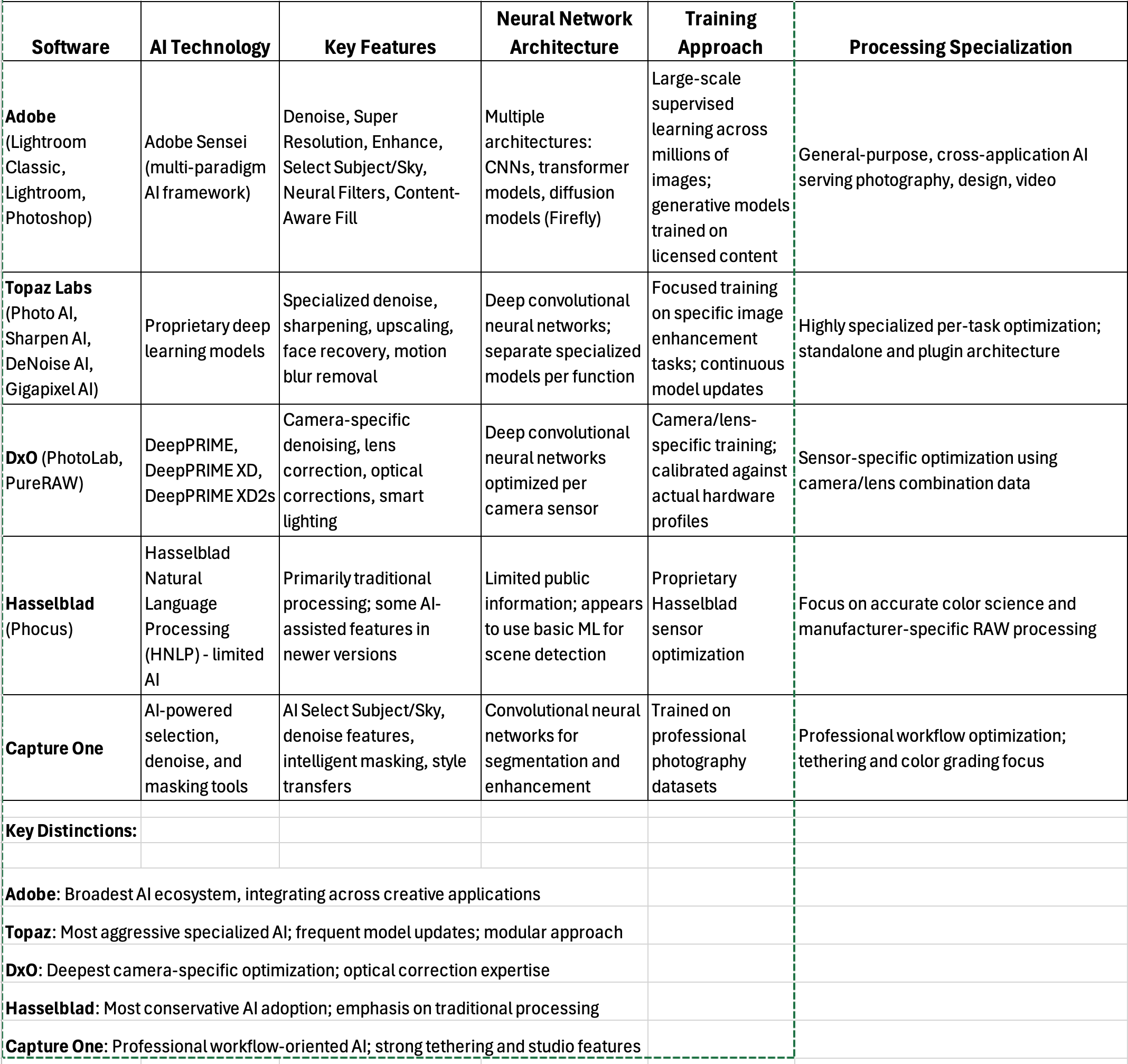
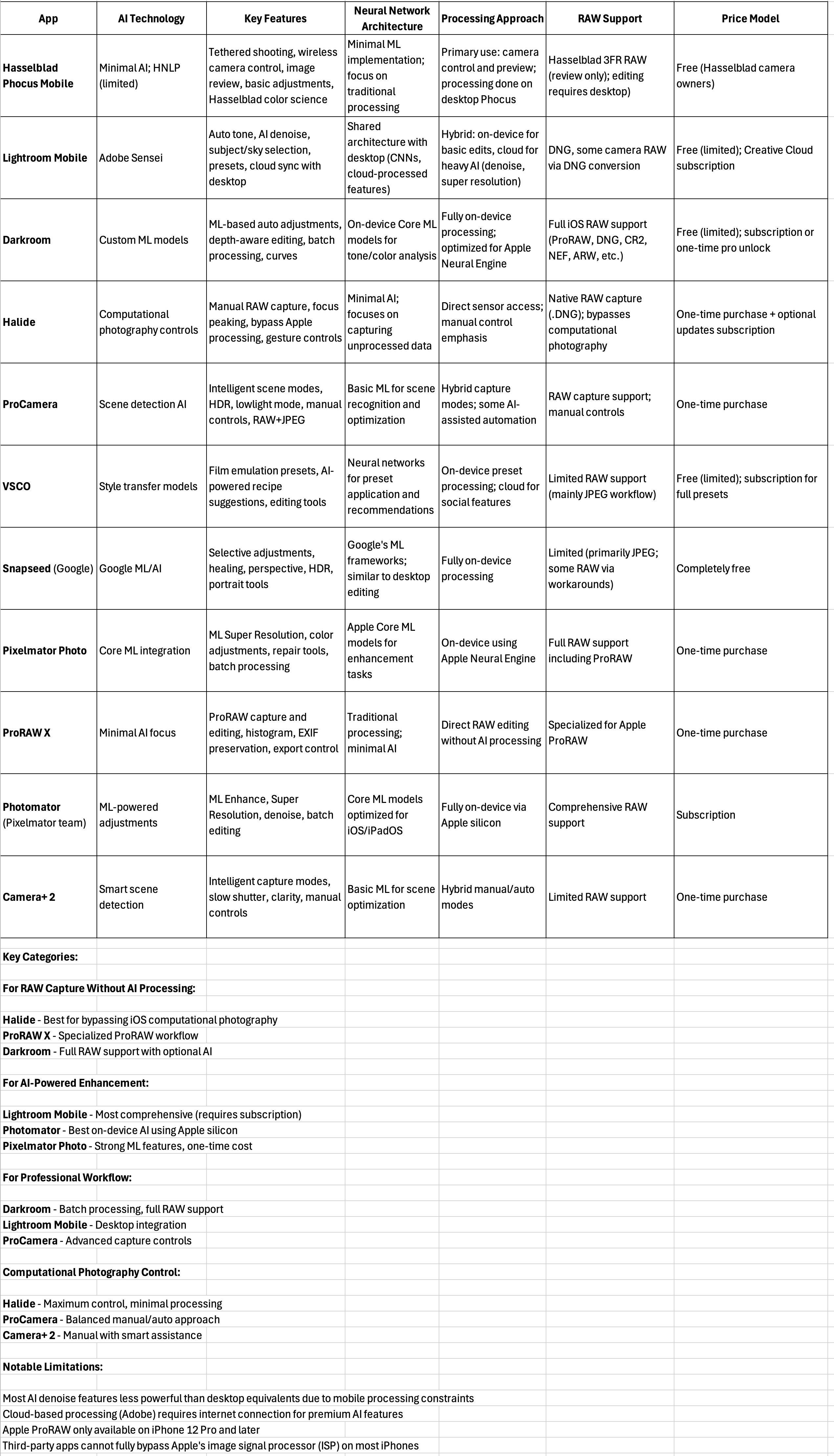
I asked my AI-assistant, Claude, to create tables comparing desktop and iOS software. Here is the output of its work.
Software for the Desktop
Software for iOS Mobile Devices
Conclusions
AI has seeped into our editing apps, both on the desktop and in our mobile devices. You can bypass AI by doing all your edits manually. The software that uses AI the least is the Phocus software by Hasselblad, but Phocus is only for Hasselblad shooters, and the camera is very expensive.
I have the Halide app on my phone, and one can disengage Apple’s Computational Photography processing. I have tried the Pixelmator/Photomator duo for the Mac and iOS. I was impressed with the Machine Learning developing features of Photomator.
You may have seen YouTube videos on how people have “ditched” their Lightroom subscriptions for less expensive apps, but I am going to keep my subscription because it ties everything together for me and includes cloud services to publish my photos.
There are lots of options available to photographers for photo editing. I wanted to make you aware of how AI is being used to process your photos. I may not have included your favorite software, but you can easily find out how your favorite compares to the ones I have discussed.
Glossary of terms
There are many terms used in our discussion. I thought it would help to have a glossary of terms. I ask Claude to help with the definitions.
AI-Chatbots and Tools
These two are my favorites, and here are their web pages:
Google’s Gemini and NotebookLM – https://gemini.google.com/app and
Anthropic’s Claude – https://claude.ai/
I will be using Claude’s output for the terms below. By the way, the answers that Claude provides are much more detailed than what I have posted. I encourage you to use Claude to explore more deeply the concepts discussed in this post.
AI-Editing Techniques
ISO – ISO is a measure of the camera sensor's sensitivity to light. In practical terms, it's one of the three pillars of the exposure triangle (along with aperture and shutter speed) that controls how bright your image appears.
Digital ISO doesn’t change sensor sensitivity - it changes amplification of the sensor’s signal. Your sensor’s native sensitivity is fixed (usually ISO 100 or ISO 64 for modern sensors). When you increase ISO, you’re amplifying that signal electronically, like turning up the volume on a microphone. At higher values of ISO the images also amplify noise. In the exposure triangle, we adjust the aperture (f2.8 is wide open, letting in more light), the shutter speed to control motion blur, and ISO to control the signal amplification and noise. In most modern cameras, we can set the aperture and the other two factors are set automatically, However, we prefer a low ISO value so as to reduce the noise in our photos.
Denoise – When we shoot images at high ISO ratings, our images may introduce noise, and the denoising tools help restore the image by reducing the noise. Denoising algorithms analyze patterns in the image to distinguish between actual image detail and random noise artifacts. They then selectively smooth or remove the noise while attempting to preserve legitimate detail and sharpness.
DxO DeepPrime
DeepPRIME is DxO’s flagship AI-powered denoising and demosaicing technology, available in DxO PhotoLab and DxO PureRAW.
DeepPRIME combines two critical raw processing steps into a single AI operation:
Demosaicing - converting the camera’s Bayer pattern sensor data into full RGB (Red, Green, Blue) information
Denoising - removing digital noise
By handling both simultaneously with a deep learning neural network, DeepPRIME achieves superior results compared to traditional sequential processing.
Technical approach:
The neural network was trained on millions of image pairs, learning to reconstruct clean image detail from noisy raw sensor data. Because it works at the demosaicing stage (before the image is fully formed), it has access to more fundamental information than denoisers that work on already-processed images.
HDR – High Dynamic Range.
Dynamic range is the difference between the darkest and brightest parts of a scene. HDR techniques allow you to capture or display a wider range of tones than what a single standard exposure can record.
In photography HDR refers to creating an image that shows detail in both highlights and shadows by combining multiple exposures of the same scene - usually a bracketed set of underexposed, normal, and overexposed shots. The merged result retains shadow detail from the overexposed frame and highlight detail from the underexposed frame.
HNNR – Hasselblad Natural Noise Reduction
HNNR is an artificial intelligence-based noise reduction system that uses neural networks to intelligently identify and remove noise while preserving detail and Hasselblad's characteristic natural color rendition.
Image Formats
RAW format
RAW format in photography refers to image files that contain minimally processed data directly from your camera's image sensor. RAW files are essentially the digital negative - they capture all the information the camera sensor records when you take a photo, with minimal in-camera processing applied. The camera can also process and export smaller-size JPEG files which have been extensively processed in-camera, and suitable for sharing on social media. However, the RAW format is more suitable for image editing.
DNG format
DNG is a RAW image format specification based on the TIFF/EP standard (ISO 12234-2), extended with additional metadata and features specific to digital photography. It can store RAW sensor data along with processing metadata, previews, and other information in a single, well-documented file structure.
A number a camera manufacturers support this stand, including Leica, Ricoh GR series, Pentax 645Z, Hasselblad X1D/X2D can output DNG, and many smartphone camera. For those cameras with proprietary RAW formats, Adobe’s DNG Converter provides a translation to the DNG format.
3FR format
.3FR (Hasselblad 3F RAW) is Hasselblad's proprietary RAW image format introduced in 2006 with the H2D camera. It's the native capture format for modern Hasselblad digital cameras including the X2D 100C, 907X, and H-system cameras. What distinguishes this format from DGN is that images are captured in 16-bit color (65,536 tonal levels per color channel) versus 14-bit color (16,384 levels per color channel).
Machine Learning Techniques
Neural Networks
A neural network is a computational system inspired by biological brain structures, designed to recognize patterns, learn from data, and make predictions or decisions without being explicitly programmed for specific tasks.
Instead of writing step-by-step instructions to solve a problem (traditional programming), you create a network of interconnected mathematical units (artificial neurons) that learn the solution by studying examples. The network adjusts itself through experience, discovering patterns in data that even humans might not explicitly recognize.
Transformer Models
Transformers are a neural network architecture, introduced by Google engineers in 2017, that revolutionized deep learning by replacing sequential processing (RNNs) with parallel processing using an attention mechanism. Originally designed for natural language processing, they've now expanded to computer vision and are increasingly relevant to photography AI. The core innovation is the Attention Mechanism, which allows for parallel processing of information. Attention lets the model dynamically focus on relevant parts of the input, regardless of position.
CNN – Convolutional Neural Networks
Designed specifically for image data
Use convolutional layers that scan images with small filters (kernels)
Each filter detects specific features (edges, textures, shapes)
Early layers: detect simple features (horizontal lines, vertical edges)
Deeper layers: combine simple features into complex patterns (eyes, noses, noise patterns)
Diffusion Models
Newer architecture gaining prominence
How They Work:
Training: Learn to gradually add noise to images until pure noise
Generation: Reverse the process - start with noise, gradually denoise
Each step removes a bit of noise, guided by learned patterns
Photography Applications:
Generative Fill (Photoshop)
AI denoise in some newer tools
Image generation (Midjourney, DALL-E, Stable Diffusion)
Extremely high quality but computationally expensive
This post does a great job walking through how AI has quietly moved into every part of the photography workflow, from cameras to editing tools like Lightroom, DxO and Topaz, while still reminding us that good images start from real photographic thinking. Lately I've been especially interested in AI tools that don't just "enhance" existing shots but actually generate photos that still feel like they came from a real camera — natural light, believable skin texture, and consistent identity across different scenes. One example is [Coza Photo](https://cozaiphoto.com) that's tuned for a camera-like look rather than obvious AI art, which makes it a surprisingly practical companion to the more traditional editing software mentioned here.